 shipyard
A macOS menu bar app for keeping up with your projects while your agents work.
Pull requests, issues, workflow runs and your agents’ pings from the repositories you watch, with one number for what needs you.
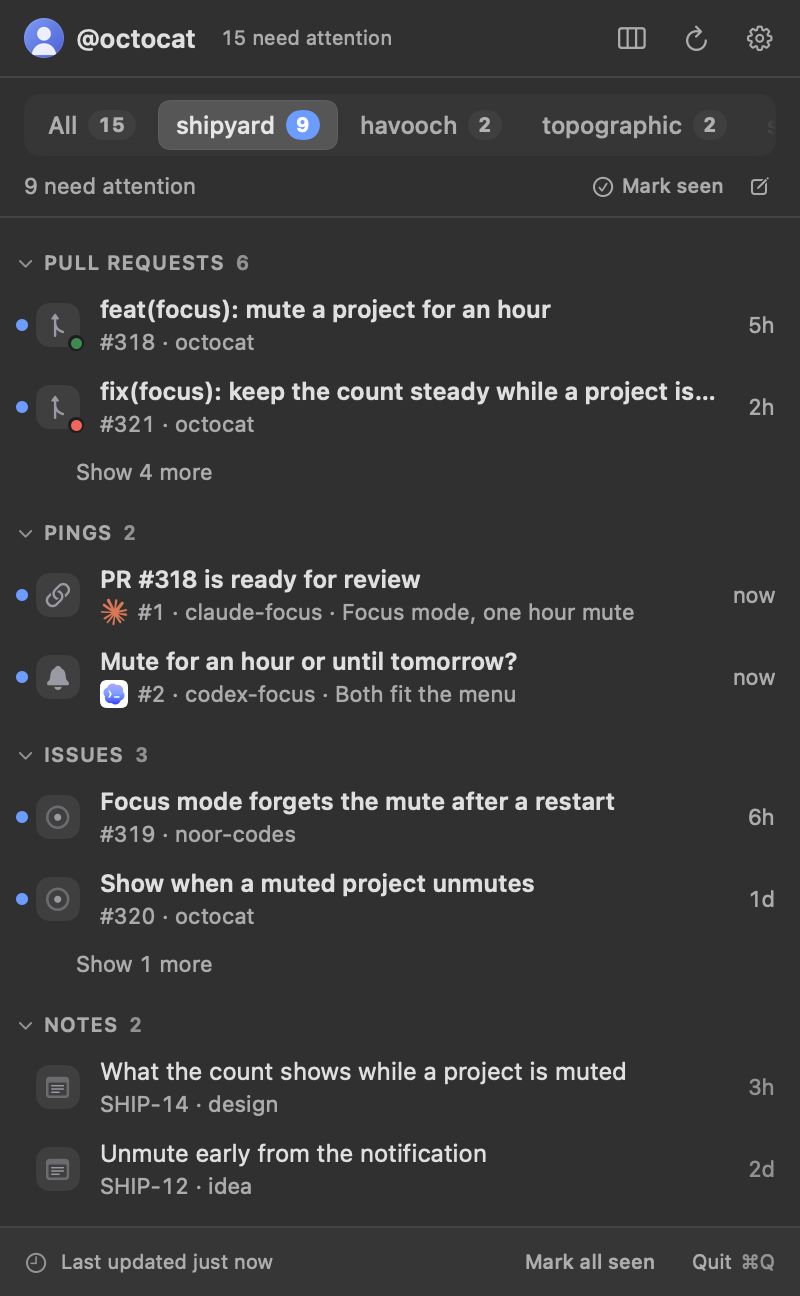
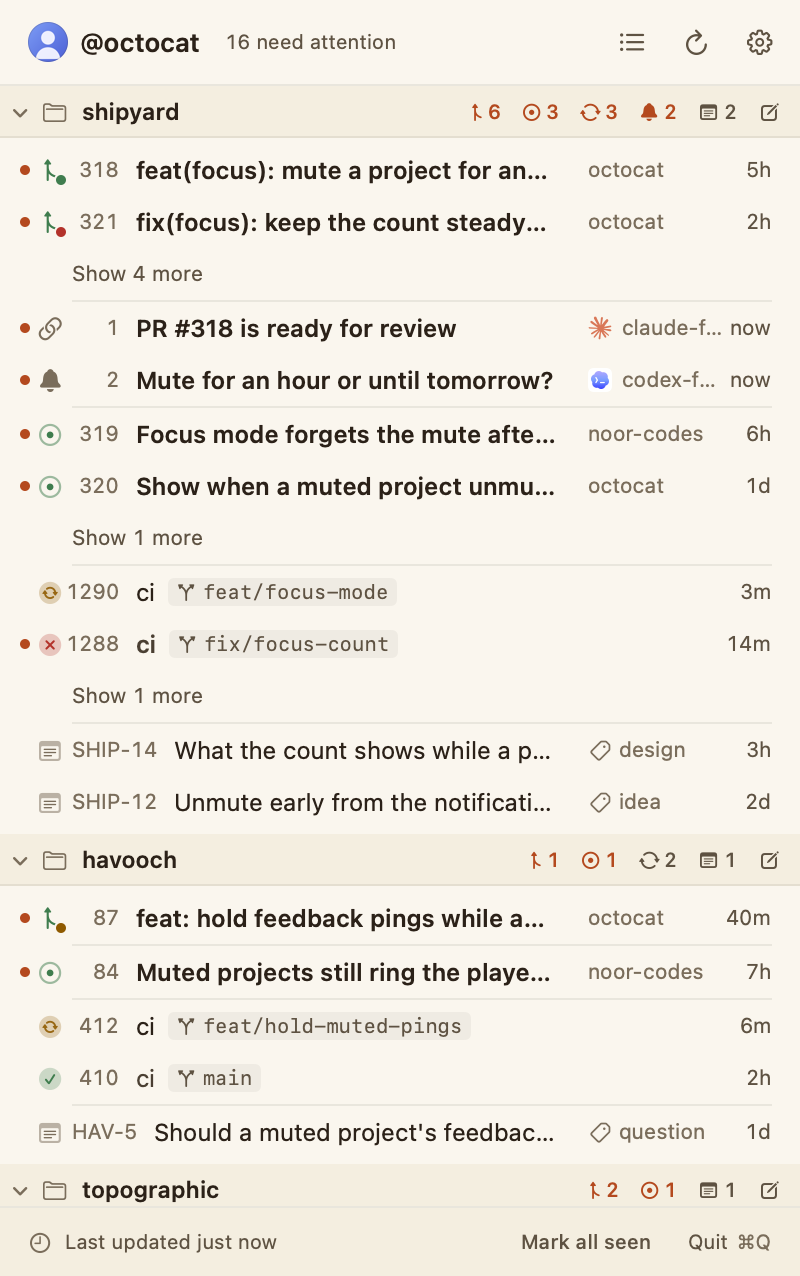
shipyard lists what your agents and other people open on GitHub, grouped into projects you name in one TOML file. You and your agents edit the file, and each save applies at once.
Start with Install and First run, or jump to the configuration reference.
What it is01
Your pull requests, issues, workflow runs, pings and notes, grouped by project in the menu bar, with one number for what needs you.
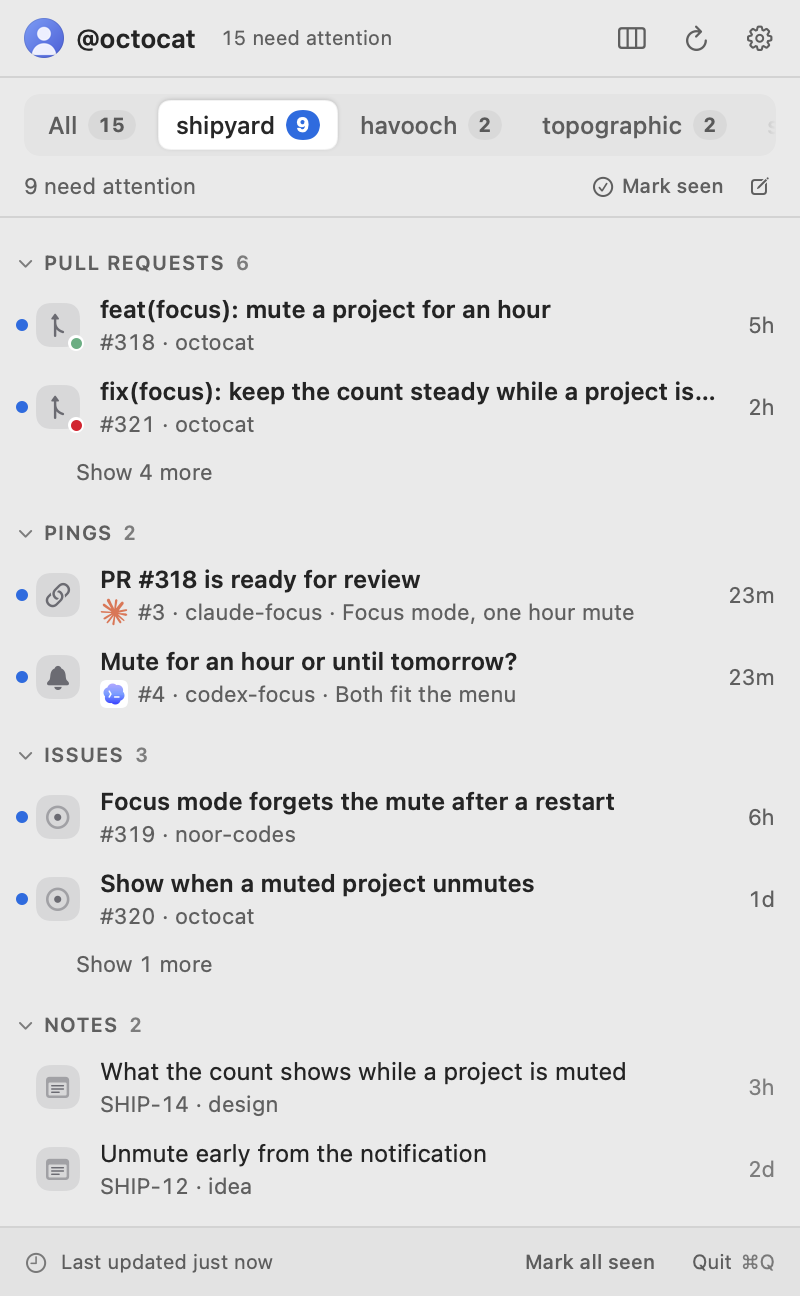
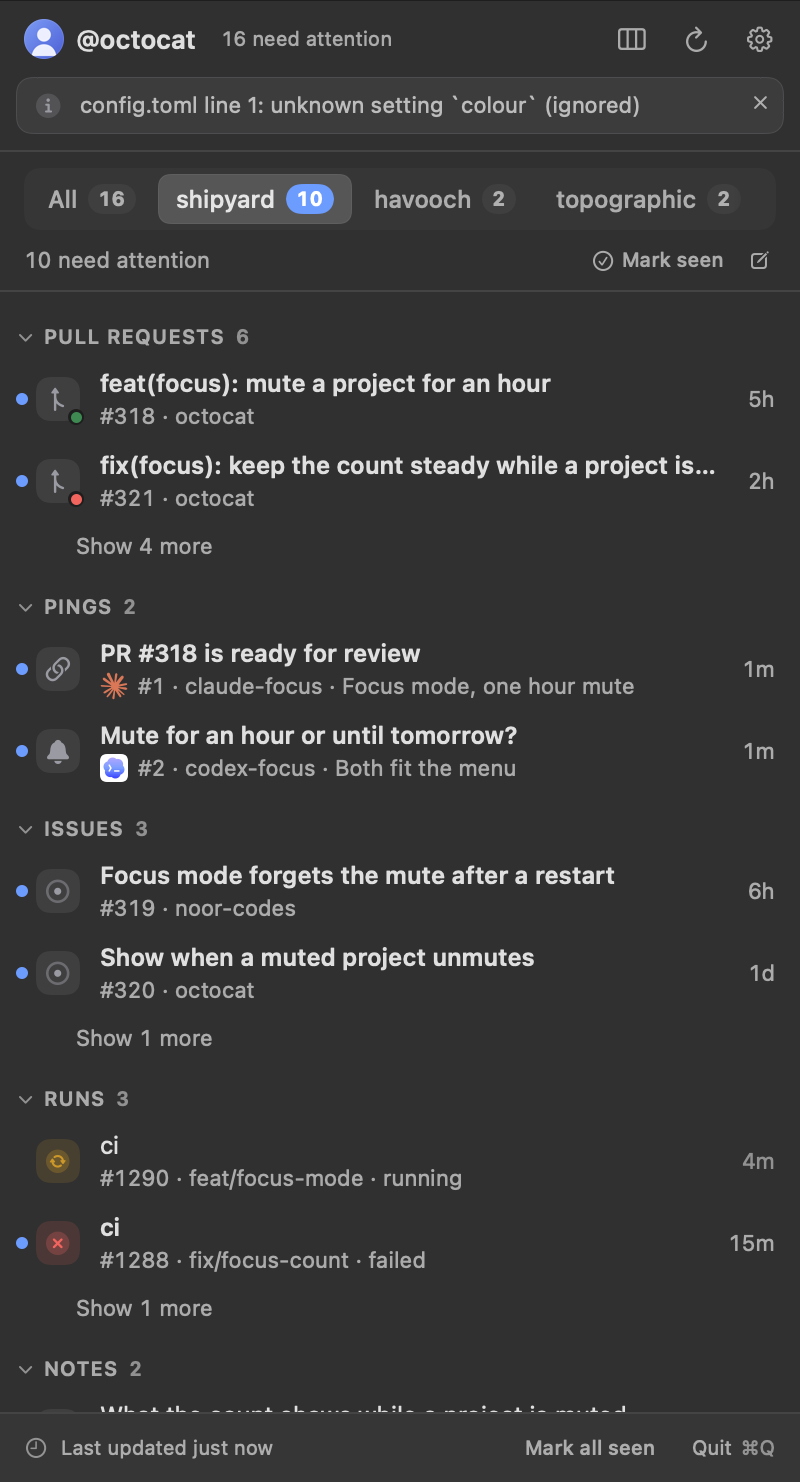
Coding agents open pull requests and issues and start workflow runs, often several at once across several repositories. shipyard lists them in the menu bar, from anyone, grouped into projects you name. The number beside its icon counts the items that need attention: new, changed since you last opened them, waiting on your review, or failing their checks.1
It can notify you when something happens, and your agents can ping you when they need you. What it shows lives in one TOML file that you, or your agents, edit.2
Install02
Download the app, or build it from source. Then give your agents the skill.
You need macOS 14 or later and a GitHub account. Building from source also needs the Command Line Tools with Swift 6, from xcode-select --install3
The download is Shipyard-<version>-macos.zip on the latest release. It isn't notarized yet, so clear the quarantine flag before the first launch, as below.4
unzip Shipyard-<version>-macos.zip
mv Shipyard.app /Applications/
xattr -dr com.apple.quarantine /Applications/Shipyard.app
open /Applications/Shipyard.app
Get the zip from the latest release.
npx skills add yahyabedirhan/shipyard -g -yThen ask your agent: “Watch this repo in shipyard”.
To uninstall, choose Sign out in the gear menu if you signed in with GitHub, quit shipyard, and delete the app and its files. Remove the agent skill with npx skills remove shipyard -g if you installed it.
rm -rf /Applications/Shipyard.app ~/.config/shipyard ~/Library/Application\ Support/ShipyardFirst run03
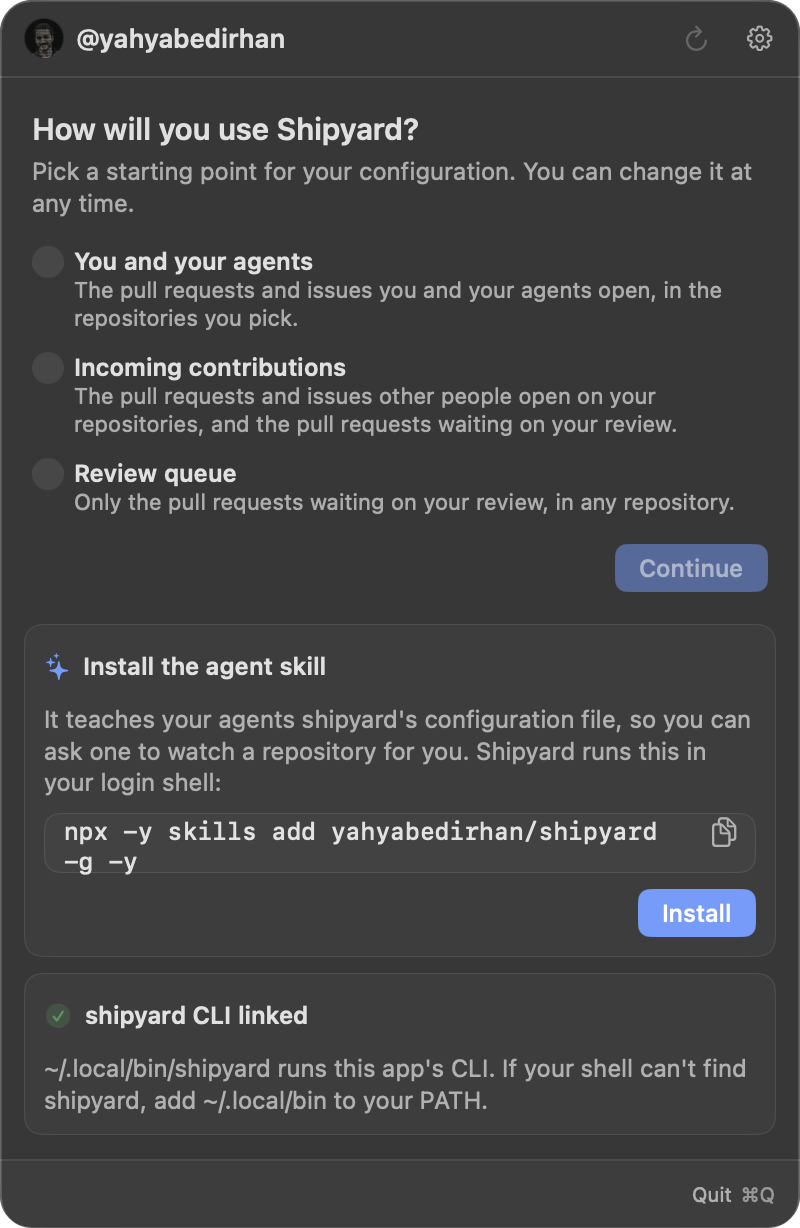
Connect GitHub, choose a preset, and pick the repositories to watch.
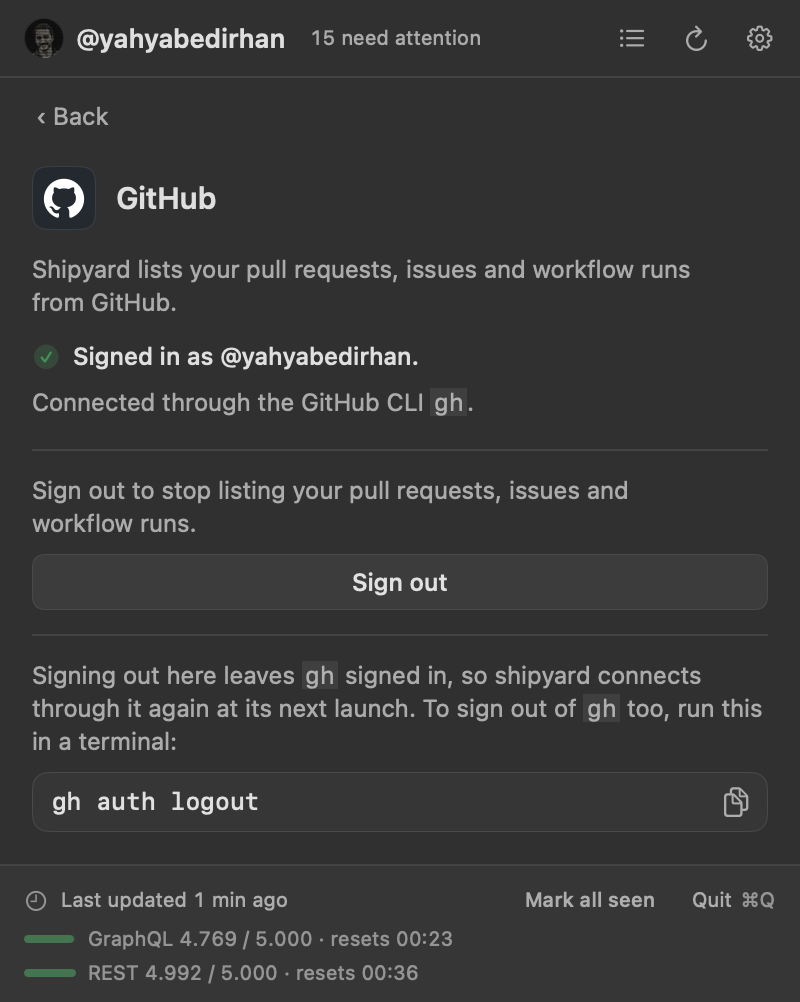
shipyard lives in the menu bar, with no Dock icon. On first launch its panel asks you to connect GitHub: Sign in with GitHub, or use the GitHub CLI if gh is signed in.5 It then offers three starting configurations, called presets, and asks which repositories to watch.
Click an item to open it on GitHub and mark it seen; ⌥-click marks it seen without opening it. ↑, ↓ and Return move through the items and open one, and ⌘R refreshes. shipyard starts at login unless launch-at-login = false6
The gear menu lists the parts shipyard uses: Set up GitHub, Set up Notion, Set up /shipyard skill and Set up shipyard command, with a check mark beside each one that is set up. Each opens a view of its status in the panel.
Presets04
Three ready-made files for shipyard's main uses. Start from one, then change any key.
Onboarding writes the preset you choose into config.toml, with your repositories in place of the examples. It writes a preset only into a file that is missing or holds nothing but version, so it never replaces your settings.7
my-agents
Everything the user and their agents open in their repositories: pull requests and issues, grouped by kind, one project per repository. Notifications are the defaults: every new pull request, every ping and notice, and an agent starting or stopping with the app.
- For
- the pull requests and issues the user and their agents open, one project per repository
- Asks for
- the repositories to watch
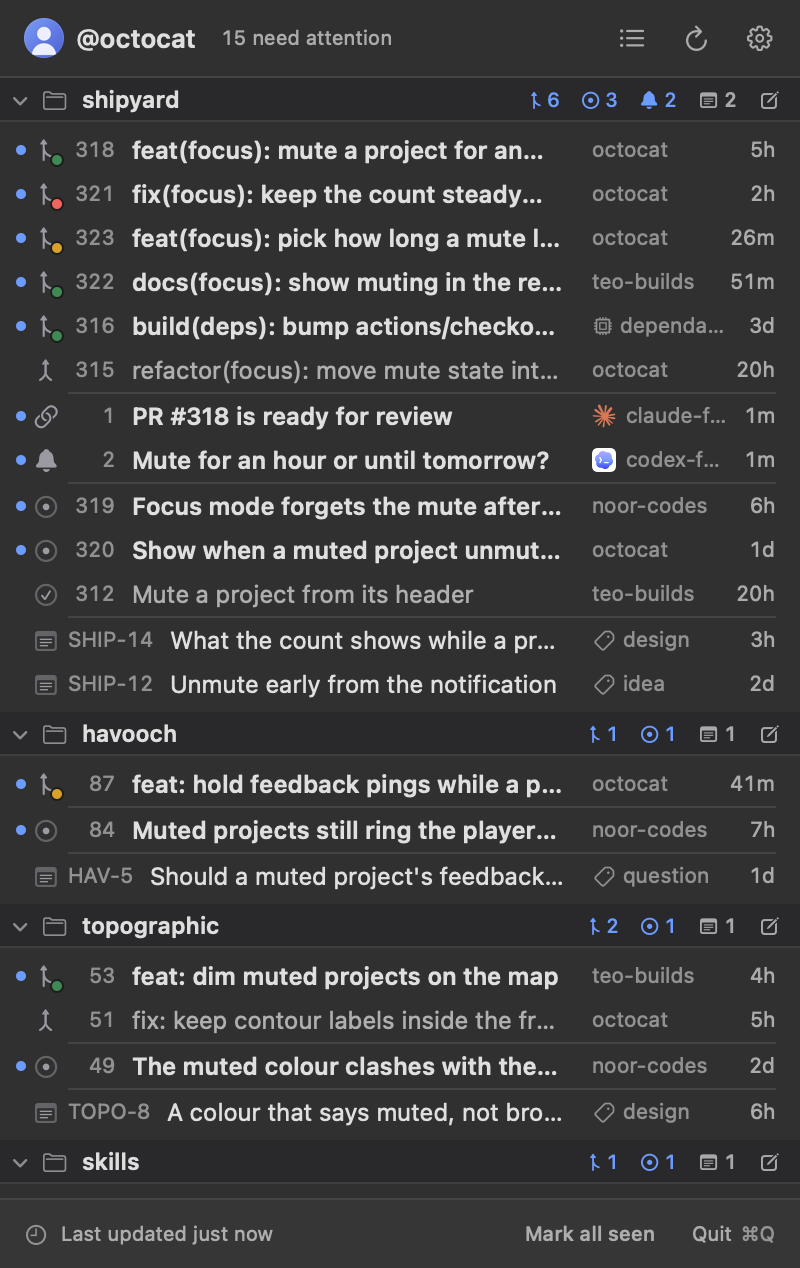
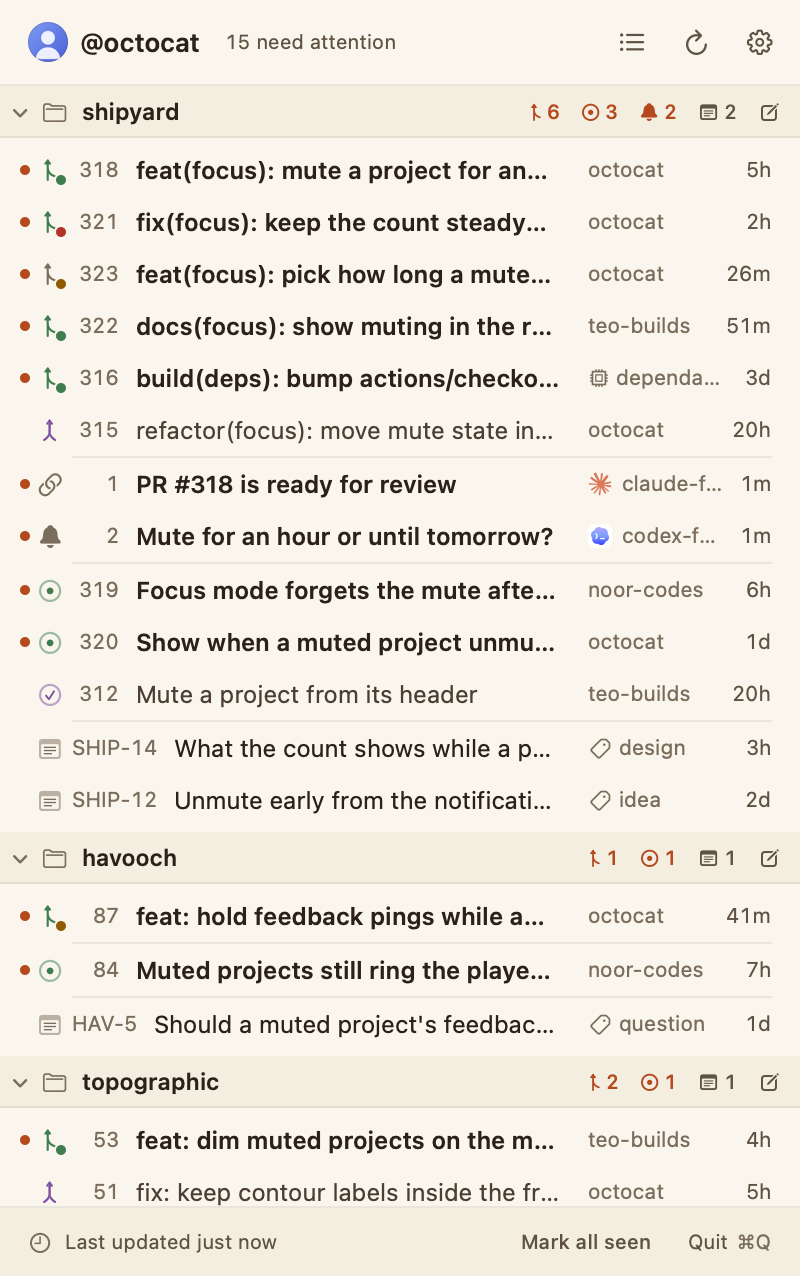
my-agents config.toml
#:schema https://raw.githubusercontent.com/yahyabedirhan/shipyard/main/schema/config.schema.json
# shipyard configuration, started from the my-agents preset: the pull
# requests and issues you and your agents open, one project per
# repository.
# You and your agents edit this file; shipyard applies changes live.
# Every key is optional; keys, defaults and events are in the schema above.
version = 1

# Group each project's items by kind: pull requests, then issues.
[defaults]
group-by = "kind"

# List issues too, not only pull requests, in every project.
[defaults.issues]
show = true

# Projects: one [[projects]] block per repository. Add more at the end.
[[projects]]
slug = "hello-world"
repositories = ["octocat/hello-world"]

[[projects]]
slug = "spoon-knife"
title = "Spoon-Knife"
repositories = ["octocat/Spoon-Knife"]
incoming-contributions
What other people open on the user's repositories, with their own (and their agents') and bots' items hidden, grouped by repository under subheaders, and a second project of the pull requests waiting on their review in any repository. It notifies when someone else opens a pull request or an issue, on each new review request, on each ping and notice, and when an agent starts or stops using the app.
- For
- the pull requests and issues other people open on the user's repositories, bots hidden, plus the pull requests waiting on their review anywhere
- Asks for
- all their repositories (
owned, as written below) or the ones they pick
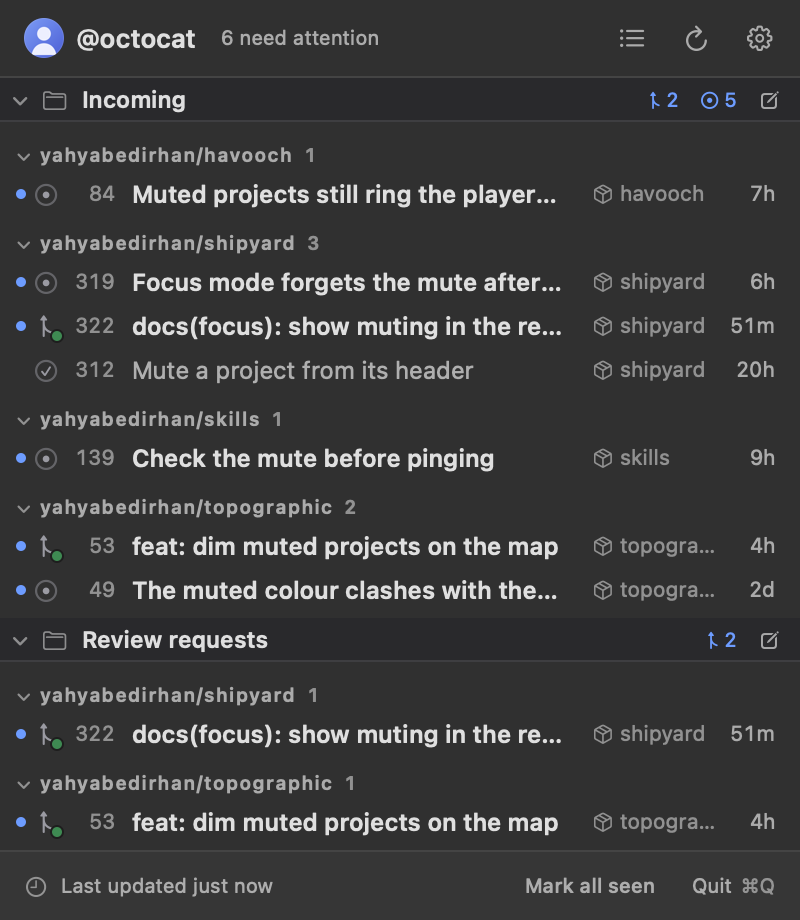
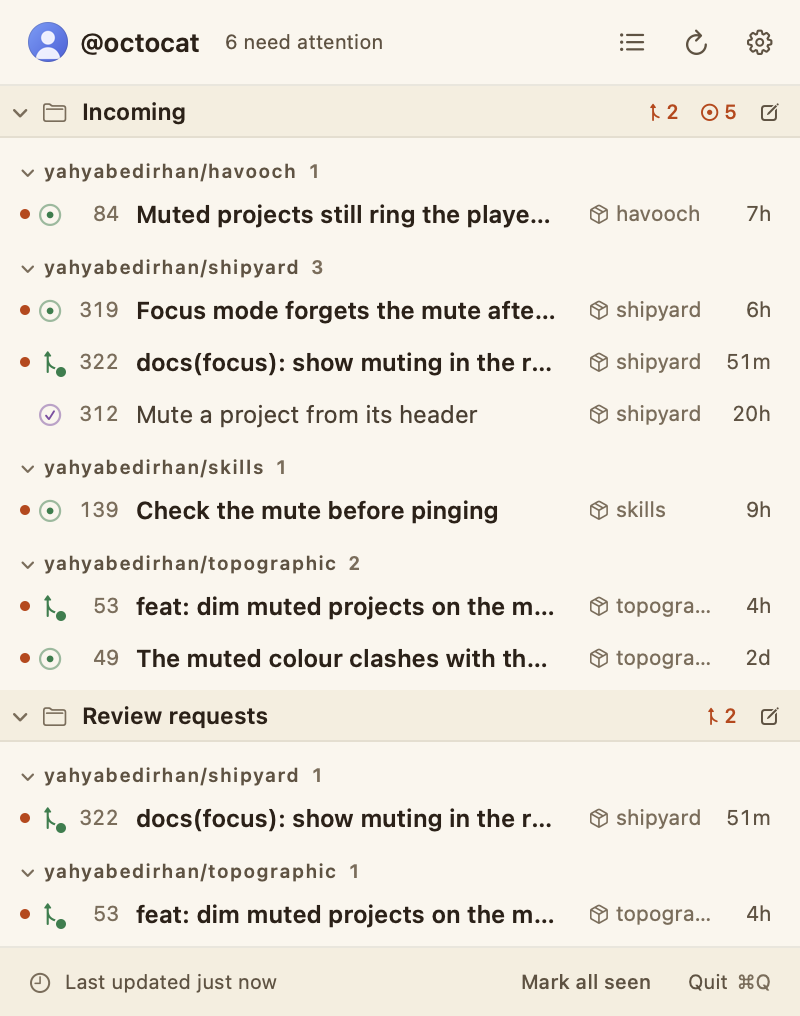
incoming-contributions config.toml
#:schema https://raw.githubusercontent.com/yahyabedirhan/shipyard/main/schema/config.schema.json
# shipyard configuration, started from the incoming-contributions preset:
# the pull requests and issues other people open on your repositories,
# bots left out, and the pull requests waiting on your review anywhere.
# You and your agents edit this file; shipyard applies changes live.
# Every key is optional; keys, defaults and events are in the schema above.
version = 1

# Group each project's items by repository, each under a subheader.
[defaults]
group-by = "repository"
subsections = true

# List other people's pull requests: yours (and your agents') and
# bots' are hidden.
[defaults.pull-requests]
authors = { hide = ["me", "bots"] }

# List other people's issues too, hiding the same authors.
[defaults.issues]
show = true
authors = { hide = ["me", "bots"] }

# Notify when someone else opens a pull request or an issue, when
# one of your agents sends a ping or a notice, and when an agent
# starts and stops using the shipyard app.
[[defaults.notifications]]
event = "pr.opened"
authors = ["others"]

[[defaults.notifications]]
event = "issue.opened"
authors = ["others"]

[[defaults.notifications]]
event = "ping.sent"

[[defaults.notifications]]
event = "agent.notice"

[[defaults.notifications]]
event = "control.started"

[[defaults.notifications]]
event = "control.ended"

# Projects: one [[projects]] block each. owned is every repository
# your account owns, including ones you create later.
[[projects]]
slug = "incoming"
title = "Incoming"
repositories = ["owned"]

# The pull requests waiting on your review, or a team's you're in, in
# any repository. anywhere lists only those, so this project shows no
# issues, and it notifies each new request (and ping, and notice) instead.
[[projects]]
slug = "review-requests"
title = "Review requests"
repositories = ["anywhere"]
pull-requests = { review-requested = true }
issues = { show = false }
notifications = [
  { event = "pr.review_requested" },
  { event = "ping.sent" },
  { event = "agent.notice" },
]
review-queue
Only the pull requests waiting on the user's review, or a team's they're in, in any repository, grouped by repository under subheaders. Each new request notifies, and so does each ping and notice.
- For
- only the pull requests waiting on the user's review, in any repository
- Asks for
- nothing
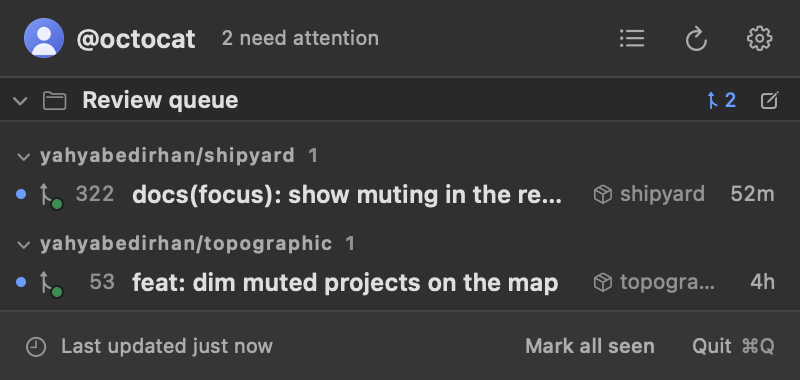
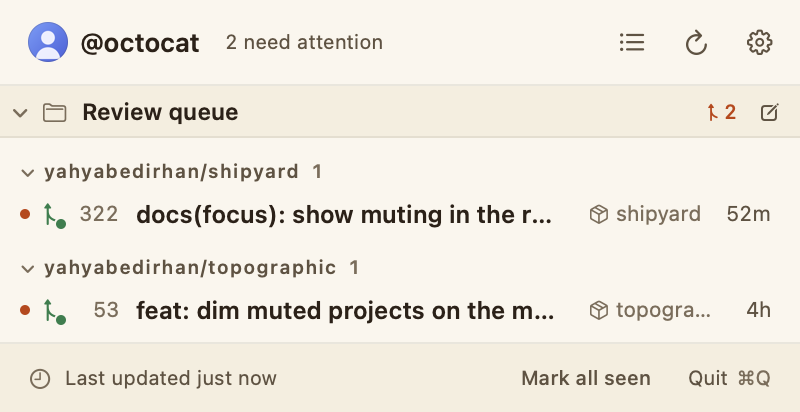
review-queue config.toml
#:schema https://raw.githubusercontent.com/yahyabedirhan/shipyard/main/schema/config.schema.json
# shipyard configuration, started from the review-queue preset: only the
# pull requests waiting on your review, in any repository.
# You and your agents edit this file; shipyard applies changes live.
# Every key is optional; keys, defaults and events are in the schema above.
version = 1

# The pull requests waiting on your review, or a team's you're in, in
# any repository, grouped by repository under subheaders. Each new
# request notifies, and so does each ping and notice your agents send.
[[projects]]
slug = "review-queue"
title = "Review queue"
repositories = ["anywhere"]
pull-requests = { review-requested = true }
group-by = "repository"
subsections = true
notifications = [
  { event = "pr.review_requested" },
  { event = "ping.sent" },
  { event = "agent.notice" },
]Layouts05
Every project in one list, or one project at a time in tabs.
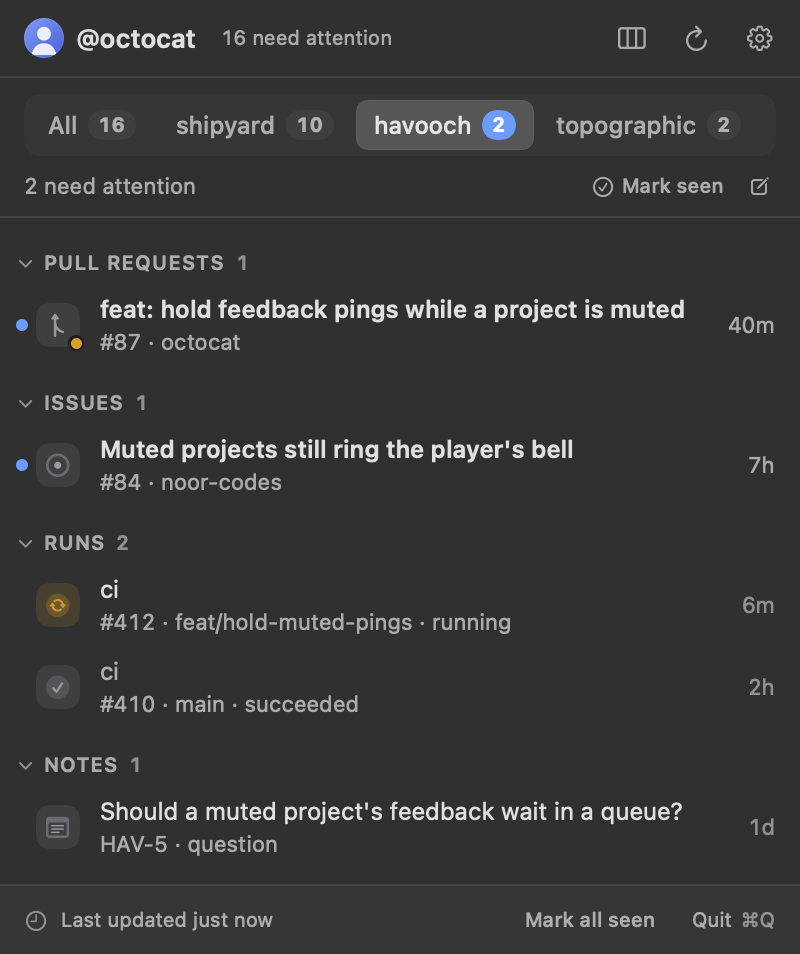
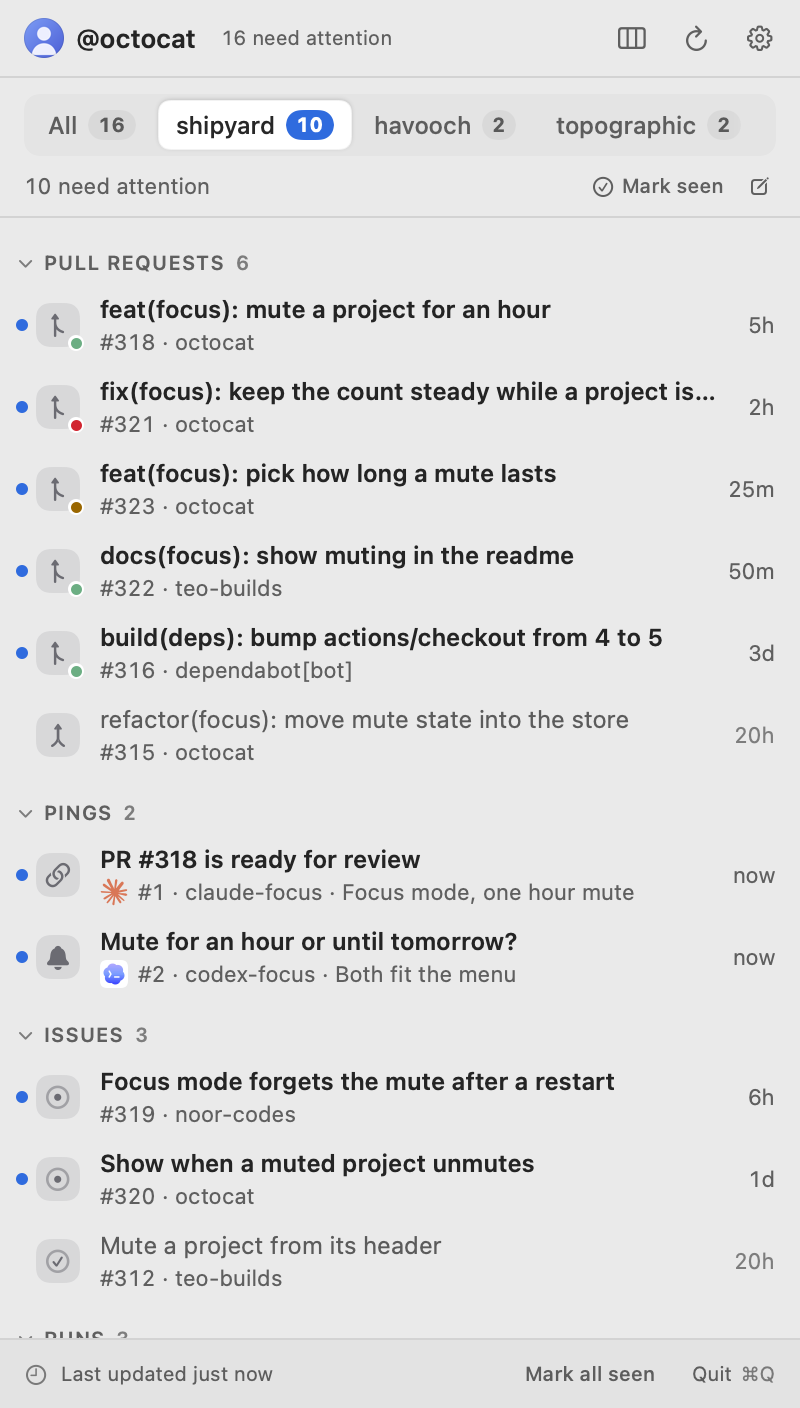
layout = "list" under [menu] shows every project in one scrolling list, one line per item under pinned project headers. layout = "tabs" shows one project at a time, with an All tab first. The layout button in the panel's header switches between them and writes the change to the file.8
Within a project, group-by groups the items by kind, repository, date or author, or not at all; sort-by orders each group; subsections puts each group under a subheader; and show-first keeps each group to its first few rows, with a Show N more row for the rest.9
[menu]
layout = "tabs"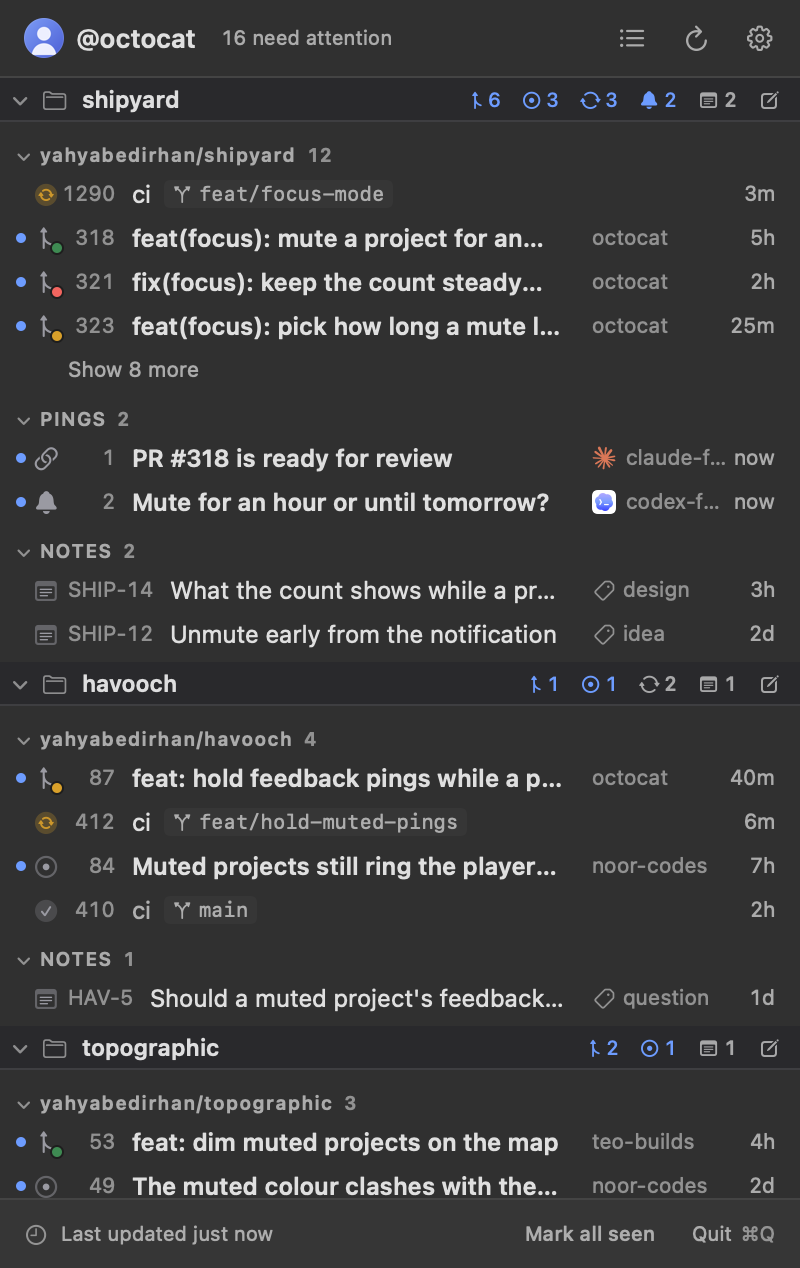
Config explorer06
Pick a snippet and see what it changes, on a mock of the panel.
Each snippet below is a few lines of config.toml. The mock under it applies them to a small set of made-up items, so you can see what the keys do before you write them.10
version = 1Pull requests and pings only, grouped by kind, newest first.
- Add the order export
- Cache the price lookups
- Bump vite from 5.4.0 to 5.4.21
- Fix the refund rounding
- Split the checkout steps
- Try a second payment provider
- PR #57 is ready for review
- Rewrite the install page
- Update renovate config
Pings and notices07
Your agents tell you when they need you, and when there's news.
A ping is a short message an agent sends with shipyard ping send: a title, an optional body and sender, and at most one action. It's listed under the projects that watch the repository of the agent's working folder, needs attention until you click it, and posts a notification. Clicking it opens a link, brings an app forward, or focuses the agent's Herdr tab.11
A notice, from shipyard notice send, is a status update that needs nothing from you, such as "tests running": a notification only, never listed, counted or kept. When in doubt, agents send a notice.
shipyard ping send "PR #57 is ready for review" --from claude --open https://github.com/my-org/shop/pull/57
shipyard ping send "Waiting for your input" --herdr --id shop-question
shipyard ping withdraw shop-question
shipyard notice send "Tests running" --from "claude · checkout" --id checkout-tests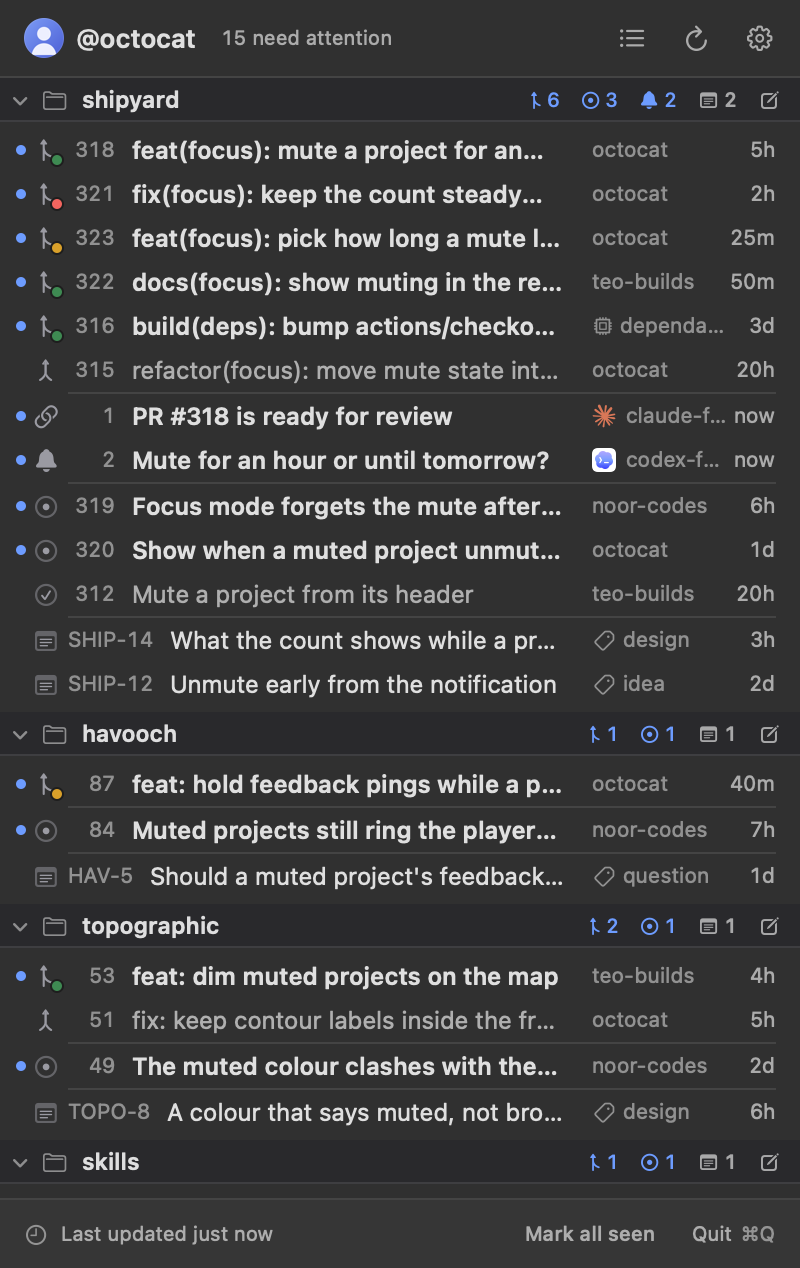
| ping send | What it does |
|---|---|
"<title>" | the one line the menu and the notification show; quote it, it's one argument |
--body <text> | more than the title fits, shown under it and in the notification |
--from <label> | who sent it, such as your name and the task ("claude · checkout"); group-by = "author" groups pings by it. Start it with your agent's name, in any case and with words after it, so the row shows its logo: claude, codex, opencode, cursor, pi, gemini, copilot, amp or droid (also Claude Code, Codex CLI, OpenAI Codex, Cursor Agent, Cursor CLI, Pi Agent, Pi Coding Agent, Gemini CLI, Copilot CLI, GitHub Copilot, Ampcode, Factory Droid) |
--id <id> | names the ping, so you can replace or withdraw it: 1 to 64 lowercase letters, digits, - and _, starting with a letter or digit. Without it, one is made up |
--open <url> | clicking it opens the URL: a page, a pull request, an artifact, or an app's deep link; the URL needs its scheme (https://…) |
--app <bundle id or name> | clicking it brings the app forward, by name ("Claude") or bundle id (com.anthropic.claudefordesktop) |
--herdr [<id>] | clicking it focuses a Herdr tab. Alone, your own pane's tab (from HERDR_PANE_ID, so only inside Herdr); or a tab or pane id as Herdr prints them, such as w1:t2 or w1:p3. The argument after --herdr is its id only when it has that shape |
--repo <owner/name> | file the ping by this repository instead of the working folder's |
--project <name> | file it under this one project, by its slug in config.toml, or else its title |
-- | ends the flags: everything after it is the title, even a word starting with -- |
Every flag of notice send
| notice send | What it does |
|---|---|
"<title>" | the one line the notification shows after the project's title; quote it, it's one argument |
--subtitle <text> | a line between the title and the body |
--body <text> | more than the title fits, shown under it |
--from <label> | who sent it, such as your name and the task ("claude · checkout"), shown under the body as "from <label>" |
--repo <owner/name> | file it by this repository instead of the working folder's |
--project <name> | file it under this one project, by its slug in config.toml, or else its title |
--image <path> | a PNG, JPEG or GIF shown with it, 5 MB at most; a relative path is from the working folder |
--sound <sound> | default (without the flag too), none for a quiet update, or a sound's name such as Glass |
--thread <key> | stacks it in Notification Center with the other notices of this key, such as one orchestration's; without it, it stacks with its project's |
--level <level> | passive: into Notification Center without a banner, for routine updates; active, the default: a banner. Critical and time-sensitive aren't offered |
--id <id> | shows it under this id: a later notice with the same id replaces it in place, and shipyard notice withdraw <id> takes it away. 1 to 64 lowercase letters, digits, - and _ |
--open <url> | clicking it opens the URL (a pull request, a run, an artifact) |
--app <bundle id or name> | clicking it brings the app forward |
--herdr [<id>] | clicking it focuses this Herdr tab or pane (w1:t2, w1:p3), then your terminal; with no id, your own pane ($HERDR_PANE_ID), as a ping's --herdr. Not on the tailnet route (see Routes) |
--button "<label>=<action>" | a button, up to 3, each with its own action: open:<url>, app:<bundle id or name>, herdr:<tab or pane id>, or herdr alone for your own pane (no herdr button on the tailnet route) |
-- | ends the flags: everything after it is the title, even a word starting with -- |
If your config.toml lists its own notification rules, add { event = "ping.sent" } to hear about pings, and { event = "agent.notice" } to let notices through: a project whose rules leave agent.notice out refuses notices, and the agent is told.
Notes in Notion08
Your own notes, one Notion database per project, listed beside the pull requests.
Each project can list your open notes from Notion, newest first, with their numbers (SHOP-7) and labels. Each project has one database, titled with the project's title, under a "Projects" page inside a "Shipyard Notes" page. Clicking a note opens it in Notion, and the pencil icon on a project's header starts a new one there.12
Notes are opt-in. shipyard reads and writes them through ntn, Notion's CLI, with ntn's own login, and keeps no Notion token of its own. Install ntn, run ntn login and choose your notes workspace, then press Connect with ntn in the gear menu's Set up Notion view.13
curl -fsSL https://ntn.dev | bash
ntn login
ntn doctor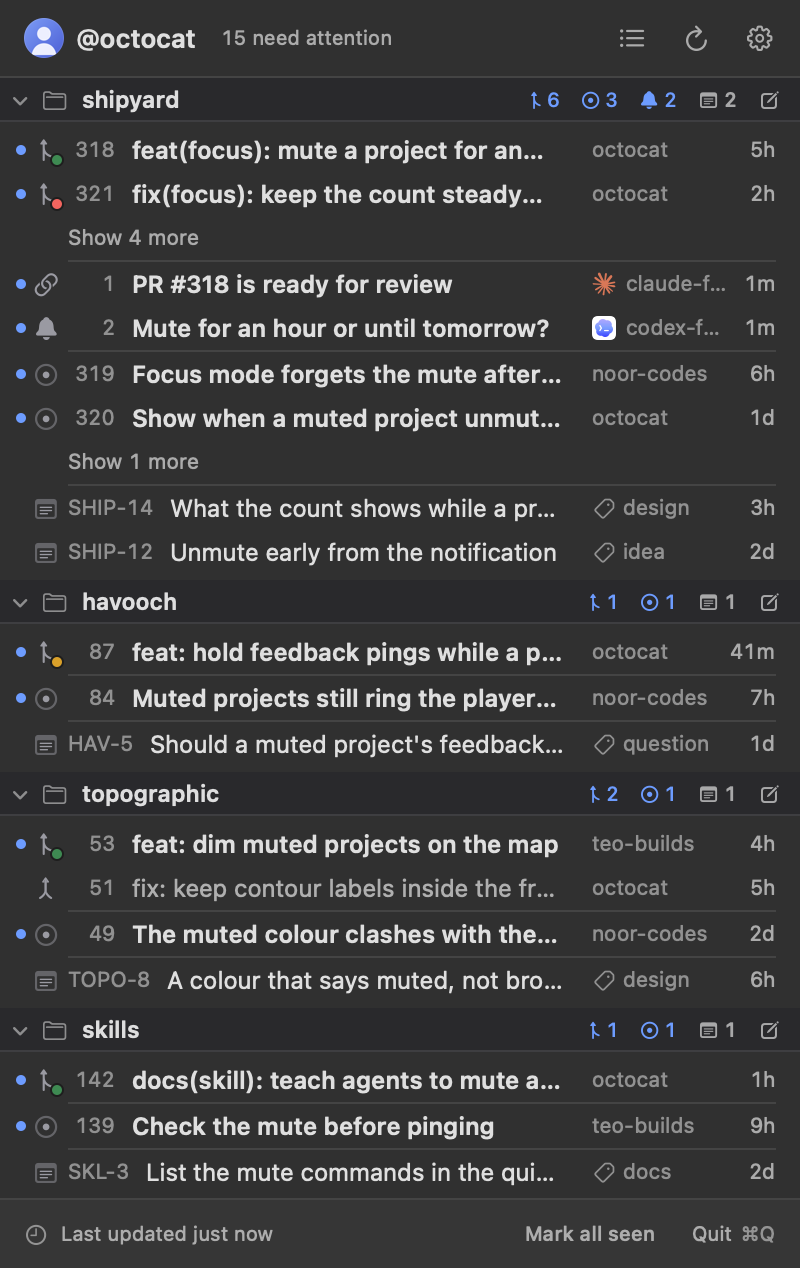
The agent skill09
Ask in your own words. Your agent edits the file and checks it.
shipyard ships an agent skill that teaches coding agents (Claude Code, Codex and others that read skills) to edit its configuration, ping you, post notices and take notes. Install it during onboarding, from Set up /shipyard skill in the gear menu, or from a terminal.14
Then ask: "Watch this repo in shipyard", "Hide dependabot's pull requests", "Tell me when CI fails on this project", "Switch shipyard to tabs". The agent edits the file, checks it with shipyard config check and the schema, and reads shipyard's verdict on the save.15
npx skills add yahyabedirhan/shipyard -g -y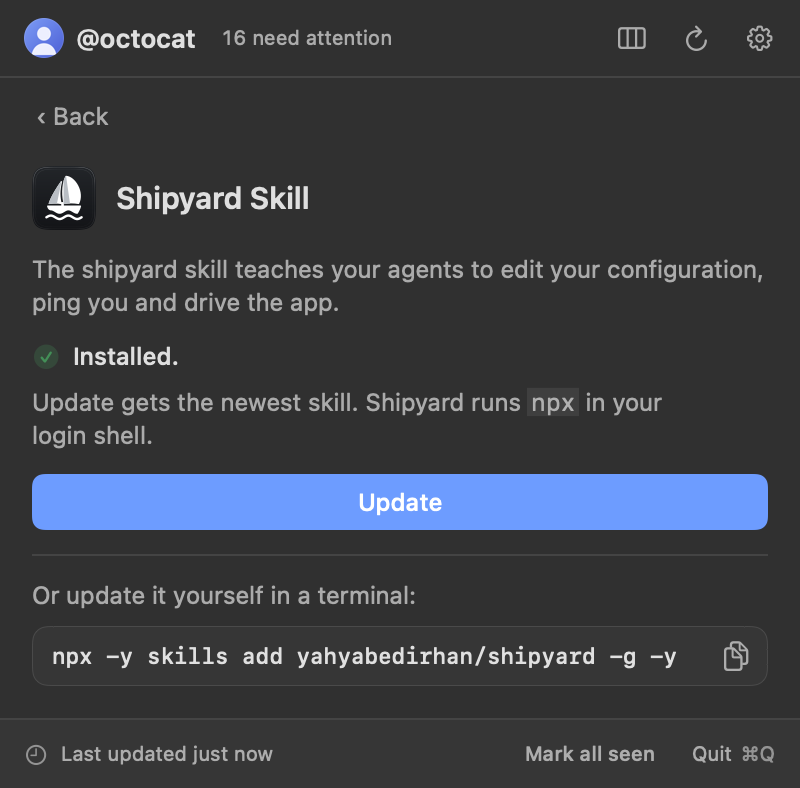
Other machines10
Agents on your other machines ping you too, through Herdr.
When your Mac's Herdr knows another machine as a saved machine, shipyard can list that machine's pings. Install the herdr-shipyard plugin on each machine, which puts the same shipyard command there, and name the machines in [remote] machines by their Herdr labels.16
shipyard asks each machine for its pings about every 30 seconds and files them under the projects that watch their repositories, or under the machine's name. Clicking one sent from a Herdr pane takes you to that agent. On those machines the plugin also pings you by itself when Herdr marks an agent blocked, and takes the ping back when the agent goes on.17
Notices travel the same way, or straight over your tailnet once [notices] listen = true and the machine's own cli.toml names your Mac.
herdr plugin install yahyabedirhan/herdr-shipyardConfiguration reference11
Every key of config.toml, its default and what it takes.
The file is ~/.config/shipyard/config.toml, or $XDG_CONFIG_HOME/shipyard/config.toml when that is set. Open configuration file in the gear menu opens it. Every key is optional and each save applies at once. A broken edit keeps the last good configuration and shows the error in the panel.18
A project's tables merge key by key onto [defaults], so issues = { show = true } keeps the default closed-window. A project's notifications replaces the default list instead. A window is a whole number and one unit, s, m, h or d, such as "30m" or "7d"19
#:schema https://raw.githubusercontent.com/yahyabedirhan/shipyard/main/schema/config.schema.json
version = 1

[[projects]]
slug = "shipyard"
repositories = ["yahyabedirhan/shipyard"]
Top level
Keys above the first table header.
| Key | Default | What it takes |
|---|---|---|
version | 1 | integer: 1 The configuration format version. Only 1 exists. Set it in every file that sets a key: a file without it reads with a warning, and from version 2 it is an error. |
theme | "Shipyard" | string The theme the panel draws with, by name, ignoring case: a built-in theme (Shipyard, Native, Graphite, Paper, Midnight or Harbor) or the name of a theme file in the themes folder beside config.toml. An unknown name is an error; a theme whose text has too little contrast on its panel reads with a warning. |
refresh-interval | "2m" | string How often to refresh: a whole number and one unit, s, m, h or d, such as "2m", at least 30 seconds. A floor: shipyard stretches it when a refresh at this interval would spend more than max-share-percent of a GitHub rate limit. |
launch-at-login | true | boolean Start shipyard when you log in. |
[rate-limit]
How much of your GitHub rate limit shipyard may use, and whether the panel shows it. The limit is shared with every other tool using your account, your agents included.
| Key | Default | What it takes |
|---|---|---|
show | "always" | string: "always", "when-low", "never" Show the rate limit in the panel footer always, only when it's low (below 25%), or never. |
max-share-percent | 10 | integer: 1 to 50 The largest share of each hourly GitHub limit (GraphQL points, REST requests) shipyard spends, in percent. |
[attention]
Which reasons make an open item need attention (count in the menu bar). Clicking an item clears all of them until it changes again. Closed items never need attention.
| Key | Default | What it takes |
|---|---|---|
unseen | true | boolean An item you haven't clicked yet. |
changed | true | boolean An item that changed (commits, comments, reviews, checks, review request) since you clicked it. |
review-requested | true | boolean A pull request that requests your review. |
checks-failed | true | boolean A pull request whose checks failed. |
[banners]
The banners above the projects in the panel.
| Key | Default | What it takes |
|---|---|---|
snooze-duration | "1h" | string How long a banner stays hidden after you click its dismiss button: a whole number and one unit, s, m, h or d, such as "1h" or "10s". After it, the banner shows again if its condition still holds. |
[herdr]
How a ping's Herdr action (shipyard ping send --herdr) takes you there: clicking it focuses the Herdr tab, then brings this terminal forward.
| Key | Default | What it takes |
|---|---|---|
terminal | unset | string The terminal app Herdr runs in, by name ("Ghostty") or bundle id ("com.mitchellh.ghostty"), brought forward after the tab is focused. Unset: only the tab is focused. |
[remote]
Your other machines, whose agents' pings the menu lists beside this Mac's. Shipyard asks each one through Herdr's connection to it (herdr --machine), never over SSH of its own.
| Key | Default | What it takes |
|---|---|---|
machines | [] | list The machines to ask for their pings, by the labels your Herdr knows them by as saved machines ("beta-vps"): never a host or an address. Each machine's pings list in a section named after it, after the projects. A label can't start with "-" or be a project's slug or title. |
[notices]
Notices from your other machines' agents (shipyard notice send), straight to this Mac over your tailnet. Off by default: nothing listens unless listen is true. The app listens on 127.0.0.1 only and takes only notices sent from this Mac's own Tailscale login; you expose the port with tailscale serve, and each other machine names this Mac in its own cli.toml.
| Key | Default | What it takes |
|---|---|---|
listen | false | boolean Whether the app listens for notices from your other machines. |
port | 47420 | integer: 1 to 65535 The port on 127.0.0.1 the app listens on, which tailscale serve exposes to your tailnet: tailscale serve --bg --http=<port> http://127.0.0.1:<port>. |
[defaults]
What every project shows and notifies about, unless the project overrides it.
| Key | Default | What it takes |
|---|---|---|
group-by | "kind" | string: "kind", "repository", "date", "author", "none" What a project's items are grouped by, one level: kind (pull requests, then issues, then runs), repository (A to Z), date (Today, Yesterday, This week, This month, Older, by the sort-by date; updated when sorting by title), author (A to Z; pings by who sent them), or none (one list). |
subsections | unset | boolean Draw each group under a subheader (its name and count) instead of after a divider line. Unset, each layout keeps its own look: dividers in the list, subheaders in tabs. A value set applies to both layouts. |
sort-by | "updated" | string: "updated", "created", "title" The order within a group: last updated (newest first), created (newest first) or title (A to Z). Open or running items always come before closed or finished ones. |
show-first | 0 | integer: 0 or more How many rows each group shows before a "Show N more" row, which reveals the rest and then reads "Show less". 0 shows every row. With group-by = "none" it caps the whole project. A group's count includes the rows it hides; the menu shows every cap again each time it opens. |
pull-requests | unset | table · its keys Pull requests: open ones, then those closed within the closed window, newest first, from the authors authors allows. |
issues | unset | table · its keys Issues: open ones, then those closed within the closed window, from the authors authors allows. |
workflow-runs | unset | table · its keys GitHub Actions runs: running now, plus finished within the finished window. |
pings | unset | table · its keys The pings agents send with the shipyard CLI (shipyard ping), each filed under a project. Pings take no states, authors, drafts or review-requested. |
notes | unset | table · its keys Your own notes, kept in Notion: one database per project, titled with the project's name, under the "Shipyard Notes" page. The menu lists a project's open notes, newest first, read through ntn, Notion's CLI, once it's installed and logged in to your notes workspace. Notes take only show. |
notifications | 5 rules: pr.opened, ping.sent, agent.notice, control.started, control.ended | list of rules · its keys The notification rules for every project that doesn't list its own, and the only rules for app control's control.started and control.ended. Default: a new pull request by anyone, a new ping, an agent's notice, and an agent starting and ending its lease on the app. |
archived | false | boolean Whether repository groups and owner/* bring in archived repositories. A repository named as owner/name is always listed. |
forks | true | boolean Whether repository groups and owner/* bring in forks. A repository named as owner/name is always listed. |
[defaults.pull-requests]also pull-requests = { … } in a project
Pull requests: open ones, then those closed within the closed window, newest first, from the authors authors allows.
| Key | Default | What it takes |
|---|---|---|
show | true | boolean List pull requests. |
states | ["open", "merged", "closed"] | list: "open", "merged", "closed" Which pull requests to list: open (drafts too), merged, closed (without merging). Merged and closed ones stay for closed-window. Those left out are never shown, counted or notified. |
closed-window | "7d" | string How long closed and merged pull requests stay listed: a whole number and one unit, s, m, h or d, such as "30m" or "7d"; "0" hides them. |
drafts | true | boolean List draft pull requests (in gray). |
authors | unset | table · its keys Whose items this kind lists: those show matches (empty: everyone) minus those hide matches; hide wins. Items left out are never shown, counted or notified. A project's authors merges key by key onto the defaults'. |
review-requested | false | boolean List only open pull requests waiting on your review, requested from you or from one of your teams. |
[defaults.issues]also issues = { … } in a project
Issues: open ones, then those closed within the closed window, from the authors authors allows.
| Key | Default | What it takes |
|---|---|---|
show | false | boolean List issues. |
states | ["open", "closed"] | list: "open", "closed" Which issues to list: open, closed. Closed ones stay for closed-window. Those left out are never shown, counted or notified. |
closed-window | "7d" | string How long closed issues stay listed: a whole number and one unit, s, m, h or d, such as "30m" or "7d"; "0" hides them. |
authors | unset | table · its keys Whose items this kind lists: those show matches (empty: everyone) minus those hide matches; hide wins. Items left out are never shown, counted or notified. A project's authors merges key by key onto the defaults'. |
[defaults.workflow-runs]also workflow-runs = { … } in a project
GitHub Actions runs: running now, plus finished within the finished window.
| Key | Default | What it takes |
|---|---|---|
show | false | boolean List workflow runs. |
states | ["in-progress", "failed", "succeeded"] | list: "in-progress", "failed", "succeeded" Which workflow runs to list: in-progress (queued or running), failed (timed out and failed to start too), succeeded. Finished ones stay for finished-window. Those left out are never shown, counted or notified. |
finished-window | "3h" | string How long finished runs stay listed: a whole number and one unit, s, m, h or d, such as "30m" or "3h"; "0" hides them. Running ones always are. |
branches | "default-and-pull-requests" | string: "default-and-pull-requests", "all" Which branches' runs to list: the default branch and open pull request branches, or all branches. |
authors | unset | table · its keys Whose items this kind lists: those show matches (empty: everyone) minus those hide matches; hide wins. Items left out are never shown, counted or notified. A project's authors merges key by key onto the defaults'. |
[defaults.pings]also pings = { … } in a project
The pings agents send with the shipyard CLI (shipyard ping), each filed under a project. Pings take no states, authors, drafts or review-requested.
| Key | Default | What it takes |
|---|---|---|
show | true | boolean List pings. |
seen-window | "24h" | string How long a seen ping stays listed, counted from when it was seen: a whole number and one unit, s, m, h or d, such as "30m" or "24h"; "0" lets it leave at once. An unseen ping stays until it's seen. |
[defaults.notes]also notes = { … } in a project
Your own notes, kept in Notion: one database per project, titled with the project's name, under the "Shipyard Notes" page. The menu lists a project's open notes, newest first, read through ntn, Notion's CLI, once it's installed and logged in to your notes workspace. Notes take only show.
| Key | Default | What it takes |
|---|---|---|
show | true | boolean List notes. |
authors = { show, hide }also in each kind’s table
Whose items this kind lists: those show matches (empty: everyone) minus those hide matches; hide wins. Items left out are never shown, counted or notified. A project's authors merges key by key onto the defaults'.
| Key | Default | What it takes |
|---|---|---|
show | [] | list List only these authors' items; empty lists everyone. |
hide | [] | list Never list these authors' items, even when show matches them. |
[[defaults.notifications]]also notifications = [{ … }] in a project
| Key | Default | What it takes |
|---|---|---|
eventrequired | unset | string: "pr.opened", "pr.merged", "pr.closed", "pr.reopened", "pr.review_requested", "pr.checks_failed", "pr.commented", "issue.opened", "issue.closed", "issue.commented", "run.failed", "run.succeeded", "ping.sent", "agent.notice", "control.started", "control.ended" The change to notify about. agent.notice is an agent's notice (shipyard notice send), refused for a project whose rules leave it out. control.started and control.ended (an agent starting and ending its lease on the app) are decided by the top-level rules only: a project's rule for one is ignored. |
authors | [] | list Whose items the rule covers, as author selectors (me, others, bots or an @login); empty is everyone. It only narrows what the project lists. A ping or a notice has no author, so a rule with authors never selects one, and authors are ignored on control.started and control.ended. |
[[projects]]
A named group of one or more GitHub repositories, shown as one section. Tables here merge key by key onto [defaults]; notifications replaces the default list.
| Key | Default | What it takes |
|---|---|---|
slug | unset | string The project's ID, unique across projects: lowercase letters and digits joined by single hyphens, such as "e-commerce". Required. shipyard ping send --project and shipyard notice send --project find a project by its slug, then by its title. |
title | unset | string The text the menu shows for the project: its section's and its tab's title. Unset: the slug. |
repositoriesrequired | unset | list The project's repository selectors, each listed once: "owner/name" (one repository, always listed, archived or not), "owner/*" (every repository a user or organization owns), or a repository group: "owned" (your own account's), "organizations" (reached through an organization you're a member of, teams included), "collaborator" (someone else's that added you), "anywhere" (open pull requests waiting on your review in any repository, from GitHub's search; the project must set pull-requests.review-requested = true and show no issues or runs). Groups and wildcards are looked up again at least hourly, so new repositories appear on their own; archived and forks decide what they bring in. Shipyard also rejects two spellings that differ only in case, which this check can't see. |
group-by | "kind" | string: "kind", "repository", "date", "author", "none" What a project's items are grouped by, one level: kind (pull requests, then issues, then runs), repository (A to Z), date (Today, Yesterday, This week, This month, Older, by the sort-by date; updated when sorting by title), author (A to Z; pings by who sent them), or none (one list). |
subsections | unset | boolean Draw each group under a subheader (its name and count) instead of after a divider line. Unset, each layout keeps its own look: dividers in the list, subheaders in tabs. A value set applies to both layouts. |
sort-by | "updated" | string: "updated", "created", "title" The order within a group: last updated (newest first), created (newest first) or title (A to Z). Open or running items always come before closed or finished ones. |
show-first | 0 | integer: 0 or more How many rows each group shows before a "Show N more" row, which reveals the rest and then reads "Show less". 0 shows every row. With group-by = "none" it caps the whole project. A group's count includes the rows it hides; the menu shows every cap again each time it opens. |
archived | false | boolean Whether repository groups and owner/* bring in archived repositories. A repository named as owner/name is always listed. |
forks | true | boolean Whether repository groups and owner/* bring in forks. A repository named as owner/name is always listed. |
pull-requests | unset | table · its keys Pull requests: open ones, then those closed within the closed window, newest first, from the authors authors allows. |
issues | unset | table · its keys Issues: open ones, then those closed within the closed window, from the authors authors allows. |
workflow-runs | unset | table · its keys GitHub Actions runs: running now, plus finished within the finished window. |
pings | unset | table · its keys The pings agents send with the shipyard CLI (shipyard ping), each filed under a project. Pings take no states, authors, drafts or review-requested. |
notes | unset | table · its keys Your own notes, kept in Notion: one database per project, titled with the project's name, under the "Shipyard Notes" page. The menu lists a project's open notes, newest first, read through ntn, Notion's CLI, once it's installed and logged in to your notes workspace. Notes take only show. |
notifications | unset | list of rules · its keys This project's notification rules; replaces [[defaults.notifications]]. An empty list means no notifications for this project. |
cli.toml
The shipyard command reads its own settings file on every machine that runs it: beside config.toml on the Mac, in ~/.config/shipyard/ elsewhere. Unlike config.toml, an unknown key there is an error.
Top level
Keys above the first table header.
| Key | Default | What it takes |
|---|---|---|
version | 1 | integer: 1 The cli.toml format version. Only 1 exists; a file without it is version 1. |
[notices]
Where this machine's shipyard notice send delivers a notice. With app-machine set, straight to the app on that Mac over your tailnet, at <app-scheme>://<app-machine>:<app-port>; without it, through the herdr-shipyard plugin for the Mac's poll.
| Key | Default | What it takes |
|---|---|---|
app-machine | unset | string The Mac running the app, by its MagicDNS name alone, short or full, such as "my-mac" or "my-mac.tail1234.ts.net": no scheme and no port. None by default. |
app-scheme | "http" | string: "http", "https" How the request travels, as tailscale serve exposes the app's port on the Mac (--http or --https). |
app-port | 47420 | integer: 1 to 65535 The port tailscale serve exposes on the Mac. |
The shipyard command12
One command for agents and scripts: pings, notices, checks and the app.
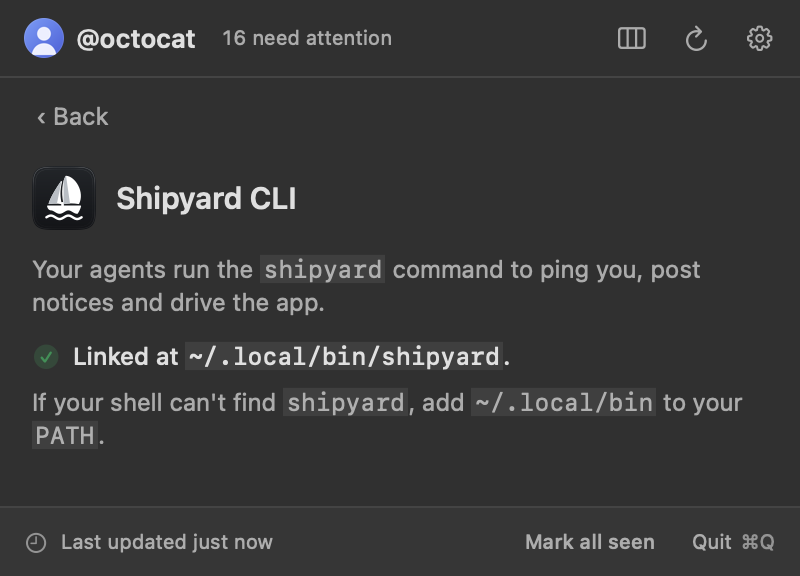
The shipyard command comes inside the app. Link it onto your PATH from onboarding or Set up shipyard command in the gear menu, which puts it at ~/.local/bin/shipyard. The herdr-shipyard plugin installs the same command on your Linux machines.20
Every command is shipyard <group> <verb>. shipyard --help lists them all, shipyard help <group> prints one group's help, and shipyard help --json lists every command for agents.21
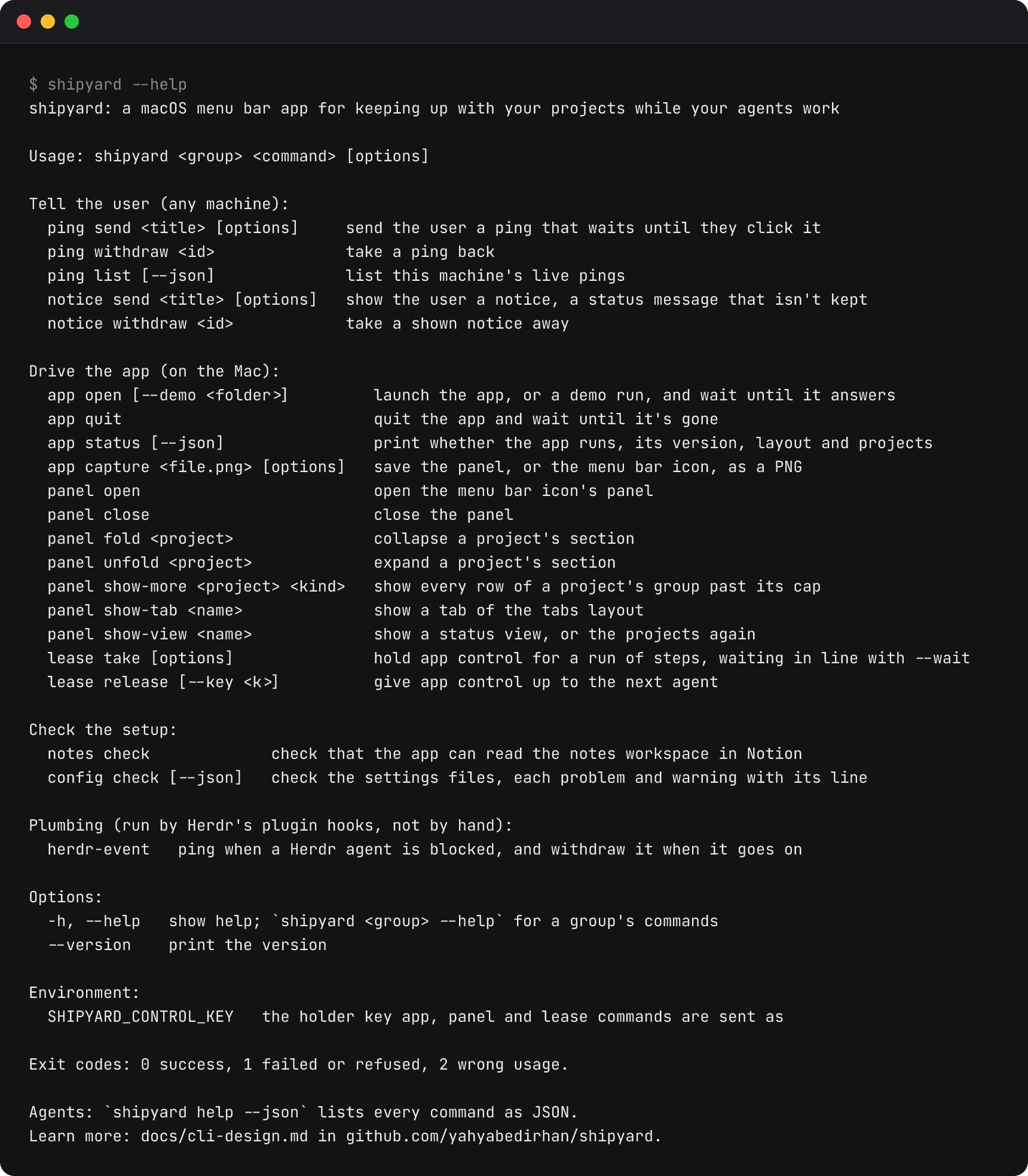
Tell the user (any machine)
| Command | What it does |
|---|---|
shipyard notice send <title> [options] | show the user a notice, a status message that isn't kept |
shipyard notice withdraw <id> | take a shown notice away |
shipyard ping send <title> [options] | send the user a ping that waits until they click it |
shipyard ping withdraw <id> | take a ping back |
shipyard ping list [--json] | list this machine's live pings |
Drive the app (on the Mac)
| Command | What it does |
|---|---|
shipyard app open [--demo <folder>] | launch the app, or a demo run, and wait until it answers |
shipyard app quit | quit the app and wait until it's gone |
shipyard app status [--json] | print whether the app runs, its version, layout and projects |
shipyard app capture <file.png> [options] | save the panel, or the menu bar icon, as a PNG |
shipyard panel open | open the menu bar icon's panel |
shipyard panel close | close the panel |
shipyard panel fold <project> | collapse a project's section |
shipyard panel unfold <project> | expand a project's section |
shipyard panel show-more <project> <kind> | show every row of a project's group past its cap |
shipyard panel show-tab <name> | show a tab of the tabs layout |
shipyard panel show-view <name> | show a status view, or the projects again |
shipyard lease take [options] | hold app control for a run of steps, waiting in line with --wait |
shipyard lease release [--key <k>] | give app control up to the next agent |
Check the setup
| Command | What it does |
|---|---|
shipyard config check [--json] | check the settings files, each problem and warning with its line |
shipyard notes check | check that the app can read the notes workspace in Notion |
Plumbing (run by Herdr's plugin hooks, not by hand)
| Command | What it does |
|---|---|
shipyard herdr-event | ping when a Herdr agent is blocked, and withdraw it when it goes on |
Options and environment
-h, --help | show help; shipyard <group> --help for a group's commands |
--version | print the version |
SHIPYARD_CONTROL_KEY | the holder key app, panel and lease commands are sent as |
Exit codes: 0 success, 1 failed or refused, 2 wrong usage. On a machine without the app, app</code>, <code>panel</code>, <code>lease</code>, <code>notes exit 2 with a pointer to the Mac.
Limits13
What shipyard does not do yet.
- macOS only
- The app runs on macOS 14 or later. The
shipyardcommand also runs on Linux, without the app. - github.com only
- It reads github.com. GitHub Enterprise Server is not supported.
- Not notarized
- macOS asks you to clear the quarantine flag before the first launch of the download.
- No Homebrew or updates
- There is no Homebrew cask and no automatic update yet.
- Settings in a file
- The gear menu shows the setup of GitHub, Notion, the skill and the command, and the layout button switches layouts. Everything else is edited in
config.toml, by you or your agents. - Herdr windows
- With Herdr 0.9.3, clicking another machine's ping focuses its pane on that machine, but the Mac's Herdr window moves there only when it already shows that machine.
Troubleshooting14
Short answers to what goes wrong most.
macOS says the app can't be opened
The download isn't notarized. Run xattr -dr com.apple.quarantine /Applications/Shipyard.app, then open it again.
The panel says the configuration has a problem
shipyard keeps running on the last valid configuration. Run shipyard config check: it names each problem with its line, and the nearest spelling when a key or value is misspelled.
Pings don't notify me
Your file lists its own notification rules without ping.sent. Add { event = "ping.sent" } beside the rules you have.
shipyard isn't found
Link it from Set up shipyard command in the gear menu, which puts it at ~/.local/bin/shipyard, and make sure that folder is on your PATH. The view says what is in the way when the link can't be made.
A ping is refused
No project watches the repository of the folder it was sent from. Send it with --project <slug>, or watch the repository in a project.
No notes are listed
Check that ntn is installed and logged in (ntn doctor), that its default workspace has a Shipyard Notes page, and that you pressed Connect with ntn. shipyard notes check says what's wrong.
Another machine's pings don't show
Check that its label is in [remote] machines exactly as Herdr saves it, and that herdr plugin list on the machine shows herdr-shipyard.
anywhere is rejected
anywhere comes from one GitHub search, so its project must set pull-requests = { review-requested = true } and show no issues or runs.
The rate limit runs low
shipyard spends at most max-share-percent of each hourly GitHub limit, 10% by default, and stretches refresh-interval to stay within it. Lower the share, or watch fewer repositories.
Changelog15
What changed in each version, with its pull requests.
Every release has an entry in CHANGELOG.md, newest first, and a download on GitHub releases. Ideas and bugs go to the issues.
- Latest release
0.7.1, 2026-10-15. The skill install output shows each line once, and the code explains itself without narration comments. It gathers #262 and #273.- These docs
- Describe
0.7.1and what has merged since. Read the changelog.
shipyard is open source under Apache 2.0. Ideas and bugs are welcome in its issues.